Understanding the ProNote AI Recorder
What is the ProNote AI Recorder?
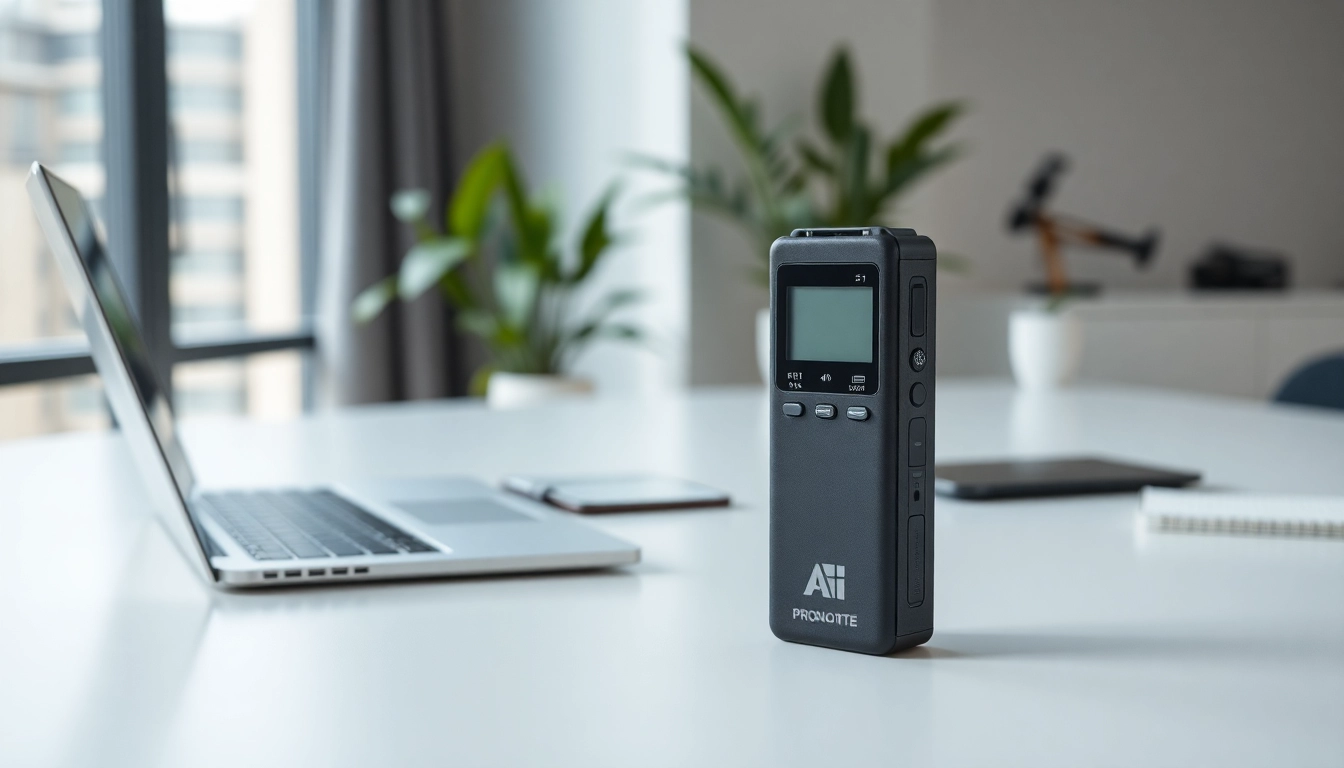
The ProNote AI Recorder is a cutting-edge device that revolutionizes the way we capture and process contextual audio. With its sleek design and advanced AI capabilities, this smart recorder is not just a passive tool; it actively transforms recorded sounds into digital formats that can be easily manipulated and organized. Ideal for students, professionals, and creatives alike, it sets new standards in audio recorders by seamlessly integrating AI to enhance the user experience.
Key Features of the ProNote AI Recorder
- Real-Time Transcription: ProNote captures audio and converts it to text as it records, allowing for instant accessibility and note-taking.
- Voice Recognition: The device can differentiate between different speakers, making it ideal for meetings, interviews, or lectures.
- Smart Storage: Integrated cloud support ensures that all recordings are securely stored and easily accessible whenever needed.
- User-Friendly Interface: A simple and intuitive interface allows users of all technical backgrounds to navigate effortlessly.
- Compact Design: Its lightweight and portable design makes it easy to carry around, suitable for any environment.
How the ProNote AI Recorder Works
The operation of the ProNote AI Recorder is straightforward yet profound. Once powered on, users can start recording with a simple touch. It leverages artificial intelligence to not only transcribe the audio in real-time but to also summarize the data after recording, enhancing comprehension and retention. Its cloud integration makes it possible to store recordings securely and retrieve them from any connected device. Users can edit transcripts on the device itself or through a companion app, ensuring flexibility in managing their audio data.
Benefits of Using the ProNote AI Recorder
Enhancing Productivity with ProNote AI Recorder
The ProNote AI Recorder surely boosts productivity by minimizing the manual effort needed for note-taking. By allowing users to focus on listening rather than writing, it enables them to engage more actively in conversations, lectures, or meetings. This shift can lead to deeper comprehension and a more dynamic exchange of ideas. Furthermore, the time saved through immediate transcription can be repurposed towards other valuable tasks, ultimately enhancing overall productivity.
Real-Time Transcription: A Game Changer
Real-time transcription is arguably the most significant advancement brought by the ProNote AI Recorder. Users can immediately see their thoughts and discussions transcribed onto the device, fostering an environment where ideas flow freely. This feature is particularly beneficial in educational settings where accurate notes can make the difference in understanding complex topics. The ability to rectify errors as they occur enhances the quality of the documented material, setting this device apart from traditional recorders.
Integration with Other Tools
The ProNote AI Recorder excels not only in capturing audio but also in integrating with various productivity tools. By connecting with note-taking applications, project management software, and email services, ProNote allows users to streamline their workflow substantially. This integration ensures that users can convert their recordings into actionable items without skipping a beat, providing a comprehensive solution that adapts to their needs.
How to Maximize the ProNote AI Recorder
Setting Up Your ProNote AI Recorder
To get started with your ProNote AI Recorder, it's essential to first download the companion app available for both iOS and Android devices. Once installed, you can synchronize your recorder with your mobile or tablet device via Bluetooth. The setup process is user-friendly, guiding you through connectivity options, ensuring you're ready to record in no time. Regularly updating the device with the latest software ensures optimal performance and access to new features.
Tips for Effective Usage
- Choose a quiet environment for recording to improve clarity.
- Practice speaking clearly and at a steady pace for better transcription accuracy.
- Regularly back up your recordings to cloud storage.
- Utilize labels for different recordings for easier organization.
- Experiment with the settings to personalize your experience.
Common Mistakes to Avoid
One common mistake when using the ProNote AI Recorder is starting a recording without checking the battery level. Always ensure that your device is sufficiently charged before crucial recordings. Additionally, do not rush the initial setup process — taking the time to customize settings can improve usability and output quality significantly. Failing to familiarize yourself with the features may result in missed opportunities to leverage its full potential.
Comparing ProNote AI Recorder with Other Devices
Unique Selling Points of ProNote AI Recorder
The ProNote AI Recorder shines due to its unique combination of portability, advanced AI capabilities, and ease of use. Unlike many traditional recorders that only capture audio, the ProNote integrates robust transcription features, and real-time feedback, and merges seamlessly with other digital tools, making it an invaluable asset for modern users who demand convenience and efficiency.
Performance vs. Competitors
When placed alongside its competitors, the ProNote AI Recorder consistently outperforms in terms of transcription accuracy and user experience. While many devices struggle to distinguish between multiple speakers, ProNote delivers superior speaker identification, offering a more coherent summation of discussions without the distress of lost context. Moreover, its intuitive interface enables a broader demographic, including those less tech-savvy, to utilize the device effectively without a steep learning curve.
User Feedback and Reviews
User feedback has generally emphasized the ProNote AI Recorder’s reliability in various settings, from classrooms to corporate meetings. Many users have reported a marked improvement in their productivity and overall satisfaction due to the device’s smart features. The auto-summarization function has been particularly lauded, as it saves users time in creating organized notes while also increasing knowledge retention through immediate feedback. Overall, the positive reception highlights the device’s value in enhancing personal and professional workflows.
Frequently Asked Questions about ProNote AI Recorder
What types of audio can the ProNote AI Recorder capture?
The ProNote AI Recorder is designed to capture a variety of audio types, including lectures, meetings, interviews, and spontaneous ideas or notes. Its voice recognition feature allows it to process distinct speakers efficiently, making it versatile in different environments.
How is the ProNote AI Recorder charged?
The ProNote AI Recorder charges through a standard USB-C port. It comes with a compact charger, ensuring reliable power for extensive recording sessions. A full charge supports several hours of usage.
Is the ProNote AI Recorder suitable for students?
Yes, the ProNote AI Recorder is particularly beneficial for students. Its real-time transcription feature helps capture lectures with accuracy, providing a reliable resource for studying while saving time on manual note-taking.
Can the ProNote AI Recorder summarize notes?
Indeed, one of the standout features of the ProNote AI Recorder is its ability to auto-summarize recordings after transcription. This function simplifies the process of reviewing notes, giving users concise overviews of what was discussed or noted.
How does the ProNote AI Recorder handle different languages?
The ProNote AI Recorder supports multiple languages, providing a versatile solution for multilingual environments. Users can set the preferred language in the app, enhancing transcription accuracy across different dialects and accents.